

Sustainability data rarely arrives in one clean, consistent format. It comes from spreadsheets, shared folders, business systems, facilities, and teams working across different reporting processes. Once that data is in Sprih, people also need to know what it represents, correct it when necessary, and use it across reporting and analysis.
This quarter, we focused on making more of that work happen directly in Sprih.
You can now connect external data sources and build reusable workflows for recurring imports. Teams can distinguish actual data from estimates, manage more of their own reference data, and recover information that was deleted by mistake.
We also expanded how freight performance and environmental impact can be analyzed, while adding new support for Scope 3 and disclosure workflows.
For many teams, sustainability data collection is not a one-time exercise. The same files and data sources need to be brought together every month, quarter, or reporting cycle.
This quarter, we added new ways to connect those sources to Sprih and reuse the setup behind recurring imports.
Sprih can now connect to external enterprise data sources such as Microsoft SharePoint and AWS S3.
Teams can configure synchronization jobs for specific folders and file types. A job can be run when needed or scheduled to run automatically. While a synchronization is running, Sprih shows the number of files being synced and the time taken.
This gives teams a way to bring files into Sprih from systems where business data is already stored, rather than repeatedly moving those files by hand.
We also introduced a guided Auto Ingestion workflow for files that need to be imported repeatedly.
When bringing in a new file format, users move through a defined process: map spreadsheet columns to Sprih fields, translate values where necessary, set defaults, and review the data before importing it. Sprih can suggest mappings and translations based on the contents of the file, while still allowing users to change them.
Once that setup is complete, it can be saved as an import configuration. The mappings, defaults, and value rules are then automatically applied when future files from the same source are imported. Draft imports are also saved, so an unfinished setup can be resumed later.
For recurring data collection, teams don’t have to rebuild the same import logic every time a file arrives.
Not every sustainability data point begins with a measured value. Teams may need to work with estimates while waiting for actual activity data, and reviewers need to be able to tell the difference.
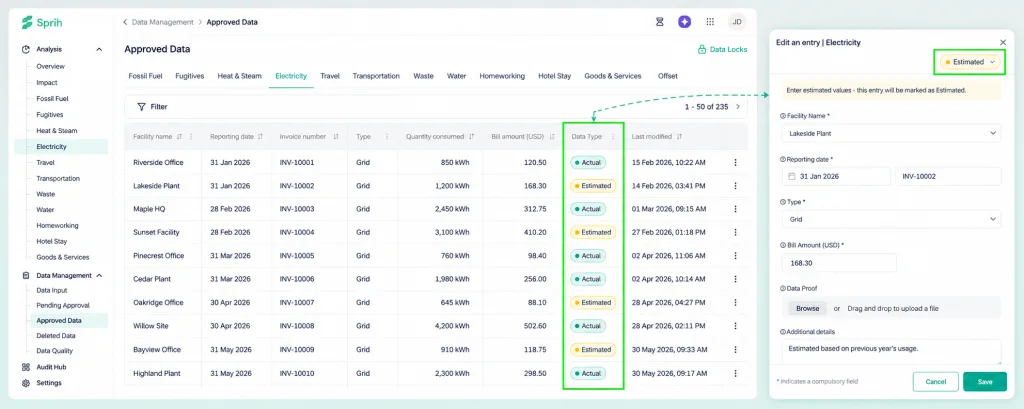
Activity data in Sprih can now be tagged as Actual or Estimated.
The designation appears with the record, including as a Data Type column in the data view. This gives sustainability teams and auditors a clearer way to identify which values are based on actual data and which are estimates.
Some of the reference data used in sustainability calculations changes over time. Electricity and fuel prices can change. Freight vehicle information can change. An organization may also use its own waste classifications or other custom factors.
This quarter, we made more of that underlying setup visible and editable within Sprih.
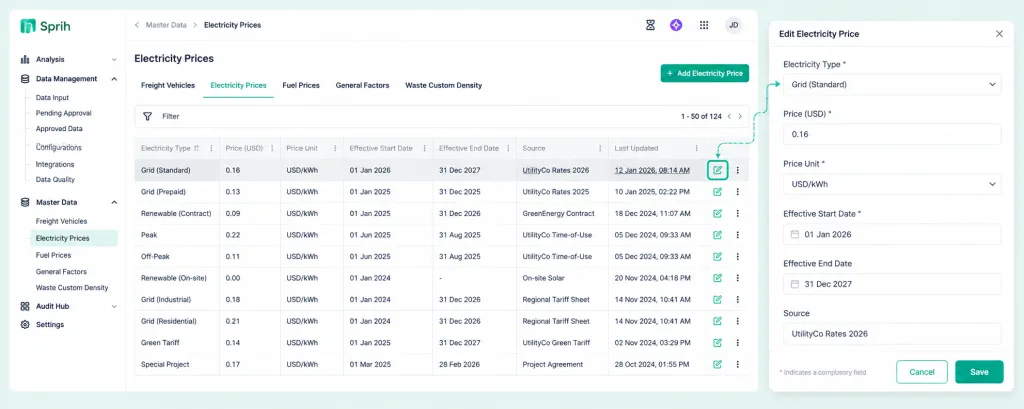
Customers can now access enabled Master Data directly in the platform.
Depending on the configuration, this can include freight vehicles, electricity prices, fuel prices, general factors, and custom waste density data. Users can view existing entries and add or edit data themselves.
For example, a team can see which electricity price applies for a particular period and extend or add price information when required. Customer-specific waste-item mappings can also be maintained through the same self-service approach.
Large spreadsheet imports can create hundreds or thousands of activity-data records. When an entire upload needs to be removed, dealing with those records individually adds unnecessary work.
We added two controls this quarter to make deletion easier while keeping accidental deletions recoverable.
Administrators can now delete an uploaded file directly from Import History. The associated records are removed as part of the same action.
For larger datasets, the deletion runs in the background and its progress appears in Active Processes.
This is particularly useful when a file is duplicated, no longer needed, or needs to be replaced with a corrected upload.
Deleting data doesn’t have to mean losing it immediately.
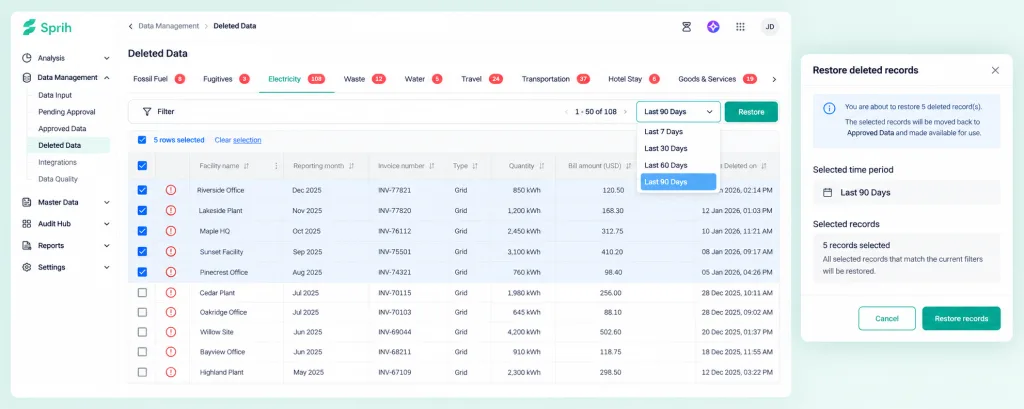
The new Deleted Data view keeps deleted records available for up to 90 days. Users can filter those records by time period and other existing data filters, then restore individual records or all records matching the selected filters.
Together, these controls make it easier to clean up large datasets without making every deletion irreversible.
Freight performance is not only about total emissions. Understanding how much energy or emissions are associated with the movement of goods can give teams another way to compare performance over time.
Sprih now calculates both freight emissions intensity and freight energy intensity per tonne-kilometre of freight activity.
Our new dashboard views let users analyze emissions or energy against freight activity, with breakdowns by scope, source, and facility and year-over-year comparisons. Freight-specific energy factors and energy calculations are also available, with the calculation details visible for individual freight records.
Teams can therefore look beyond total freight emissions and compare the emissions and energy associated with the amount of freight being moved.
For businesses reporting across multiple group companies, the same environmental information may need to be brought together at the group level.
Sprih now supports cross-entity environmental data synchronization for BRSR reporting.
Relevant environmental metrics can flow across group entities instead of being entered again for each reporting workflow. This is designed to reduce manual re-entry and make group-level BRSR reporting easier to manage and review.
A significant part of disclosure work happens after the underlying sustainability data has already been collected: figures still need to be moved into the required reporting format.
This quarter, we added support for generating a pre-filled CDP environmental-data workbook from data already held in Sprih.
Sprih can now populate the CDP Environment Data Excel template using data from a selected reporting period.
The generated workbook includes environmental data used in CDP, covering energy, water, waste, and GHG emissions. Data is populated facility by facility, with the current reporting period and previous-year comparison included where required.
Instead of manually transferring figures from Sprih into the CDP template, reporting teams can start with a workbook that has already been populated from the data in the platform.
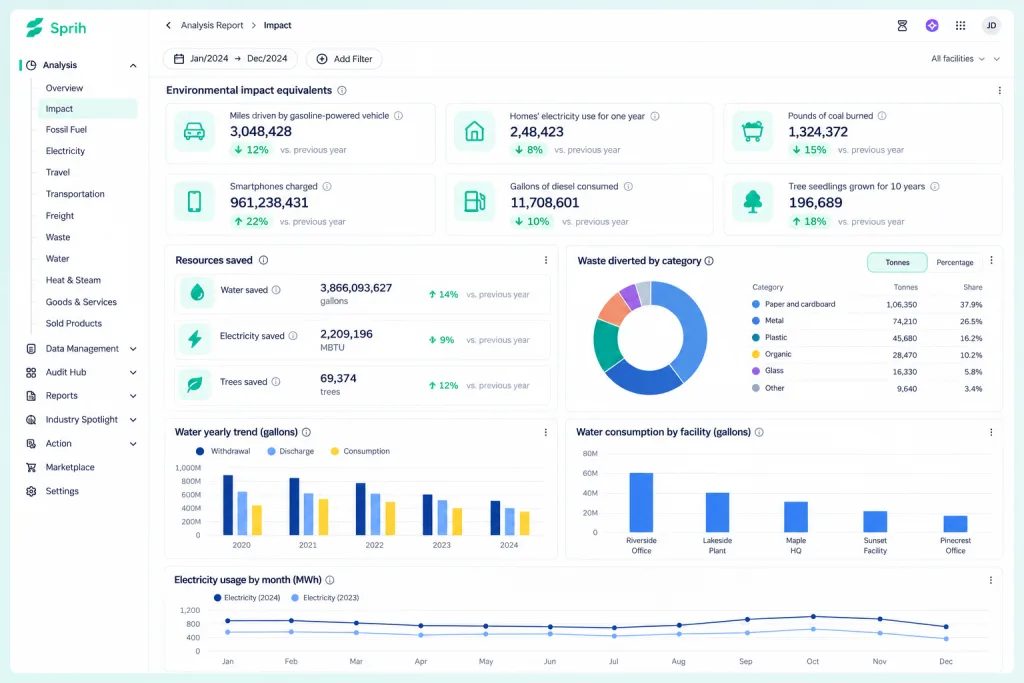
We also introduced an Impact Dashboard that brings together environmental outcomes from sustainability initiatives.
The dashboard provides a consolidated view of measures such as resources saved, emissions avoided, and waste diverted. It is designed to help teams measure and communicate the environmental outcomes associated with their sustainability programs.
Several improvements this quarter also focused on what happens when users are working with large volumes of data.
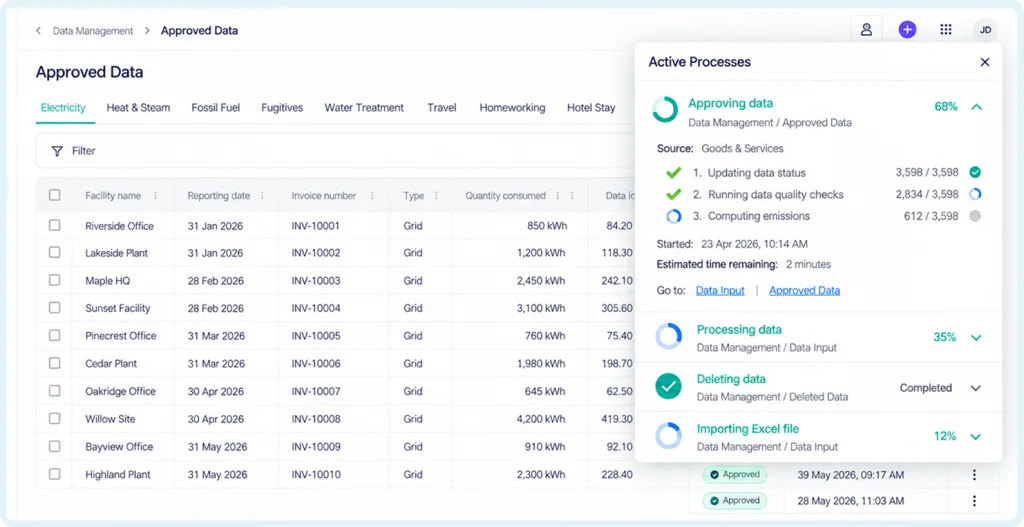
Sprih now shows live progress for background operations such as bulk approvals, bulk deletion, and Excel-based data ingestion.
For example, when thousands of records are approved together, users can see the progress as Sprih updates their status, runs data-quality checks, and calculates emissions.
This gives users visibility into work that continues in the background instead of leaving them waiting without knowing its status.
The underlying operational information used to calculate emissions, such as electricity consumed, fuel used, distance travelled, or goods purchased.
A measure of freight activity representing one tonne of goods transported over one kilometre.
Emissions measured relative to an activity. In the freight dashboard, this is greenhouse gas emissions per tonne-kilometre.
Energy consumed relative to an activity. For freight, this is energy consumption per tonne-kilometre.
A GHG Protocol category covering relevant emissions from assets leased by the reporting company that are not already included in Scope 1 or Scope 2.
A GHG Protocol category covering relevant emissions from assets owned by the reporting company and leased to others.
Reference information used by Sprih when processing or calculating sustainability data, such as freight vehicle information, electricity prices, fuel prices, and other configured factors.