

This quarter, we expanded the flexibility customers have over emissions calculations, strengthened checks on activity data, and added new controls for managing reporting across teams.
You can now use organization-specific emission factors while retaining a clear calculation trail, get better visibility into activity data uploaded in bulk, assign reporting questions to the people responsible for answering them, and protect approved data from later changes.
Different facilities, locations, or reporting methodologies may require different emission factors. This quarter, we expanded the flexibility to use those factors without making the resulting emissions figures harder to trace.
Administrators can now add custom emission factors and define where and when they apply. A factor can be set for an individual facility, a state, or an entire country, and for a specific time period.
This gives you the flexibility to use factors that reflect different operations or reporting methodologies rather than applying the same default factor everywhere.
When a custom factor is added, Sprih displays the corresponding standard factor alongside it. This gives administrators a useful reference point when reviewing custom values before they are used in emissions calculations.
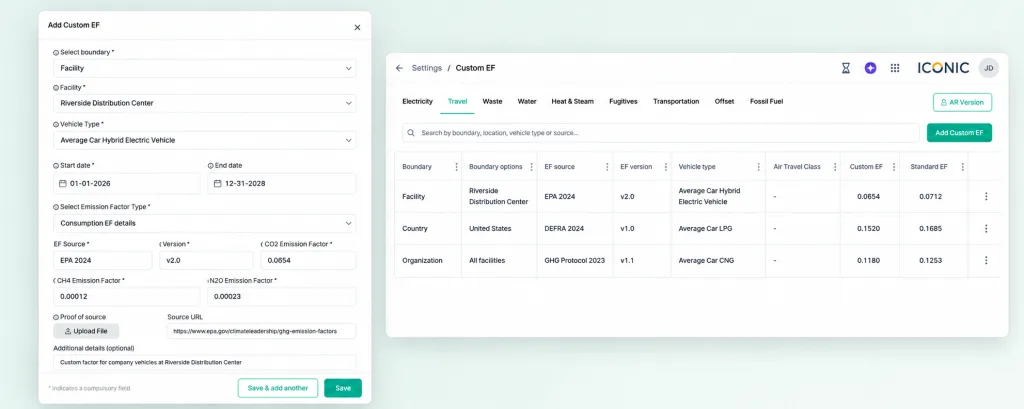
You can also select which IPCC Assessment Report Sprih uses for Global Warming Potential (GWP) values. Different selections can be applied across locations and time periods.
This helps keep calculations aligned with the GWP methodology your organization has adopted for reporting.
Custom emission factors and selected GWP values remain visible within Sprih’s calculation breakdown.
Open an individual emissions record and you can see the underlying activity data, formula, emission factor, and GWP values used to calculate it.
This means using your own calculation methodology does not come at the cost of traceability. The information needed to explain how an emissions figure was calculated remains available in one place.
Large sustainability datasets often arrive in spreadsheets covering multiple facilities, business units, and activity types. This quarter, we strengthened how that data is validated and made it easier to see what each upload produced.
Activity data uploads now include stricter validation around fields that do not apply to a particular entry.
Sprih ignores values entered in non-applicable fields across both standard Sprih templates and custom Excel formats. This helps activity records map to the appropriate emissions categories and emission factors before calculations are performed.
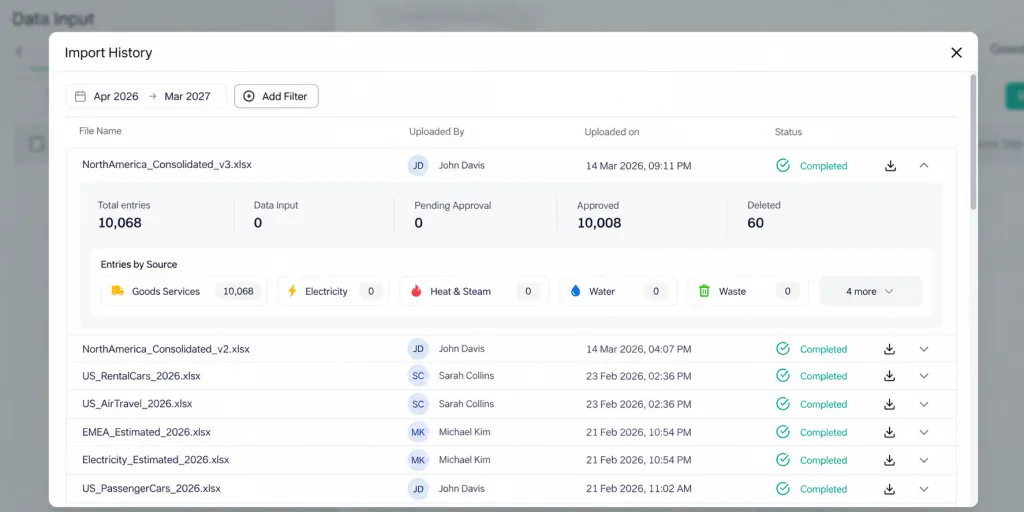
We also expanded Import History to give teams a clearer record of what happened to the activity data in each uploaded file.
You can see how many records an upload created and whether they are awaiting approval, approved, or deleted. For files containing multiple activity types, you can also see how those records are distributed. The original uploaded file remains available for reference.
This makes it easier to confirm that a large upload was processed as expected. If a particular record needs to be reviewed later, teams can also trace it back to its source file.
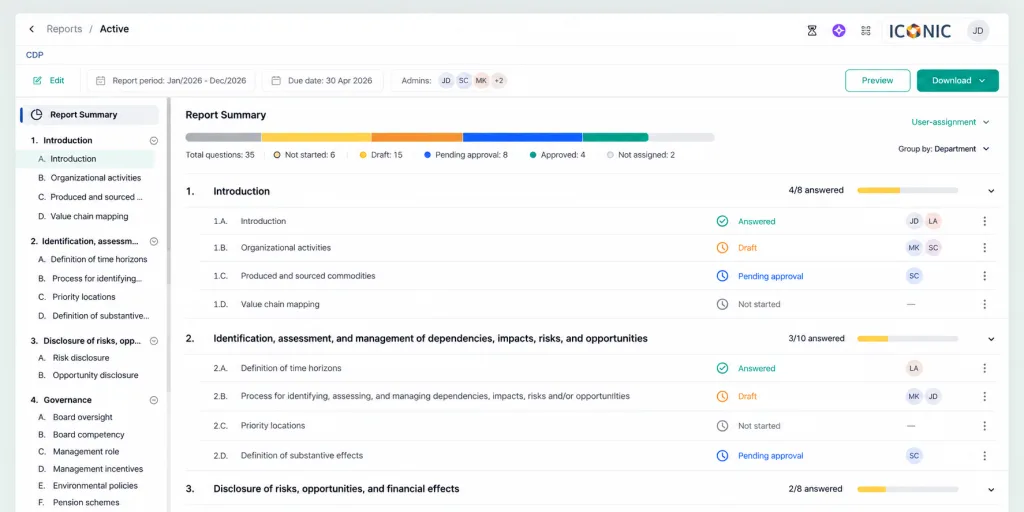
Regulatory or sustainability reports like BRSR and CSRD often require information from several teams across a business. We introduced reporting assignments to make those responsibilities visible within Sprih itself.
Administrators can assign reporting questions to departments or individual team members.
The person coordinating the report can see directly in Sprih who is responsible for each question, without having to manage ownership separately from the reporting process.
Report progress can be viewed by department, supervisor, or individual contributor. Sprih also flags questions that have not yet been assigned.
At any point, the team coordinating the report can see which questions remain unanswered, who is responsible for them, and where responsibility still needs to be assigned.
Once activity data for a reporting period has been reviewed and finalized, teams need a way to prevent routine uploads or edits from changing it unintentionally.
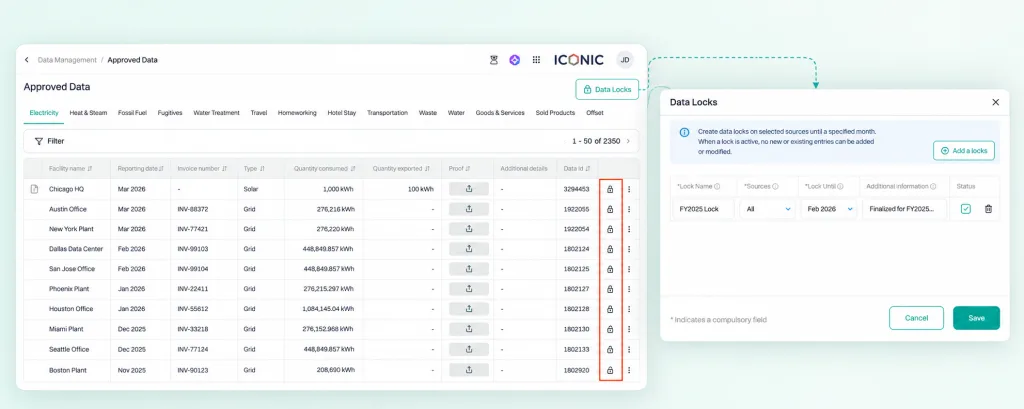
This quarter, we introduced Data Locks to give administrators control over when approved activity data can still be changed.
Administrators can lock approved activity data up to a selected month. The lock can apply across all activity types or only to selected ones.
While it is active, new entries cannot be added to the locked period and existing entries cannot be edited.
This helps preserve the activity data behind finalized emissions figures and prevents later changes from unintentionally altering them.
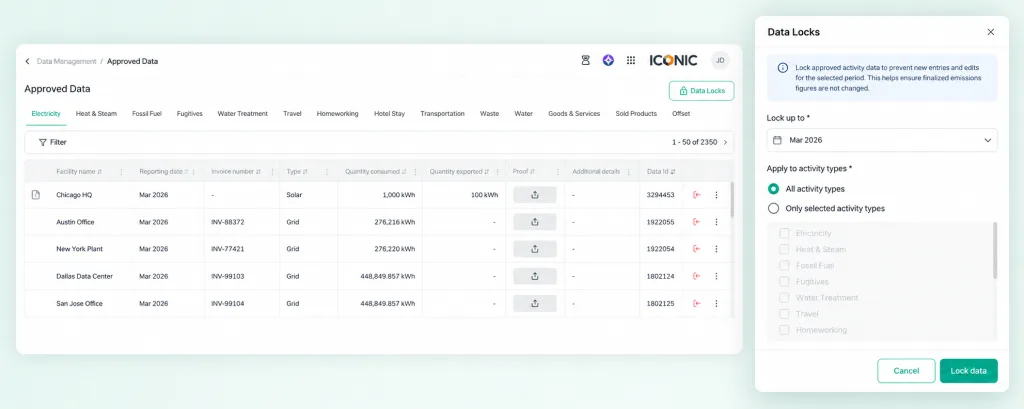
Locked records are clearly marked within Approved Data. Teams and reviewers can see which records have been finalized and which remain open to changes.
If a legitimate correction is required, an administrator can remove the lock before making the change. This keeps corrections possible while ensuring changes to finalized data are deliberate.
We extended currency conversion rates for major global currencies through 2025. Spend-based emissions calculations for 2025 purchases can therefore use exchange rates from the corresponding year.
For rail travel within India, Sprih can now calculate journey distances using origin and destination stations across the Indian railway network.
Teams can enter the stations travelled between without having to determine the journey distance separately before calculating emissions.
Customers with specific IT security requirements can restrict access to Sprih to approved IP addresses or IP ranges. Access attempts from outside those networks are blocked and logged.
A value used to convert activity data — such as electricity use, fuel consumption, or business travel — into an estimate of the greenhouse gas emissions associated with that activity.
A measure used to compare the warming impact of different greenhouse gases by expressing them relative to carbon dioxide (CO₂).
A scientific assessment published by the Intergovernmental Panel on Climate Change (IPCC). Different Assessment Reports contain updated GWP values that can be used when calculating emissions in CO₂-equivalent.
An estimate of emissions based on the amount spent on a product or service, typically used when more specific activity or supplier data is not available.